Black Friday offer · Ends November 26
The Everything
Bundle 2026
Every paid workshop and resource from 2026, plus 12 AI Skills you can run inside Claude or ChatGPT immediately. Keep them forever.
One-time offer. Expires on November 26 and won't come back after.
Here’s what you get
Immediately get access to all 12 paid workshop sessions and 3 Quarterly AI Briefings I hosted in 2026 – 15+ hours of video to watch on your schedule, whenever you like.
If you want to shortcut your path to value, just use the AI Skills that come with each workshop. These are simple ZIP files you can download and install in Claude or ChatGPT to put what the workshop taught into action.
Here's a quick video showing an example of two AI Skills I've been using for staying on top of my never ending stream of emails (the full system is explained in the AI Mailroom workshop):
Workshops + AI Skills

The AI Mailroom
Turn your inbox into a daily briefing, follow-up tracker, and priority tool across all accounts
Comes with these AI Skills
- AI Mailroom — Organizes emails, creates briefings, and tracks follow-ups.

Your AI Data Analyst
Get reliable insights from your business data without hiring a data team (or waiting on one)
Comes with these AI Skills
- AI Data Analyst — Cleans spreadsheets, flags errors, and answers questions about your data.

Dump Your Dashboard – or not?
How to talk to your business data with AI and know when to trust the answer
Comes with these AI Skills
- Metric Guide Builder — Defines metrics so AI answers match your dashboard.

The 82% Customer Support Chatbot
See an AI system that solves 82% of customer requests on autopilot
Comes with these AI Skills
- Support Bot Advisor — Assesses chatbot fit and plans your first launch.
- Chat Log Analyzer — Finds common questions, failures, and gaps in chatbot conversations.

The Email Classification Engine
Build an AI that reads, sorts, and evaluates your emails – locally, with no API costs
Comes with these AI Skills
- Classifier Builder — Sets clear rules for sorting emails and requests.

The AI Decision Engine
Make faster, cheaper business decisions with AI – at scale.
Comes with these AI Skills
- Classifier Builder — Sets clear rules for sorting emails and requests.
- AI Accuracy Tester — Tests AI accuracy on your examples before going live.

Profitable AI Workshop
Find 1 Clear Opportunity for Your Business in 60 Minutes
Comes with these AI Skills
- Opportunity Scanner — Finds worthwhile AI opportunities and estimates their costs.

The 10K Threshold
Define the minimum value that makes an AI project worth your time.
Comes with these AI Skills
- Threshold Finder — Sets the minimum value an AI project must deliver.

The AI Opportunity Scan
Find concrete AI opportunities that are relevant to your business.
Comes with these AI Skills
- Opportunity Scanner — Finds worthwhile AI opportunities and estimates their costs.

The Solution Concept
Turn your AI idea into something you can build, buy, or put on a roadmap
Comes with these AI Skills
- Solution Concept Writer — Turns an AI idea into a practical one-page plan.

The Selection
Choose an AI opportunity and turn it into a practical solution concept.
Comes with these AI Skills
- Solution Concept Writer — Turns an AI idea into a practical one-page plan.

The Build
Choose the tools and templates for a working first version.
Comes with these AI Skills
- Build Planner — Chooses tools and steps for your first working version.
- System Prompt Writer — Writes reusable instructions for consistent AI behavior.
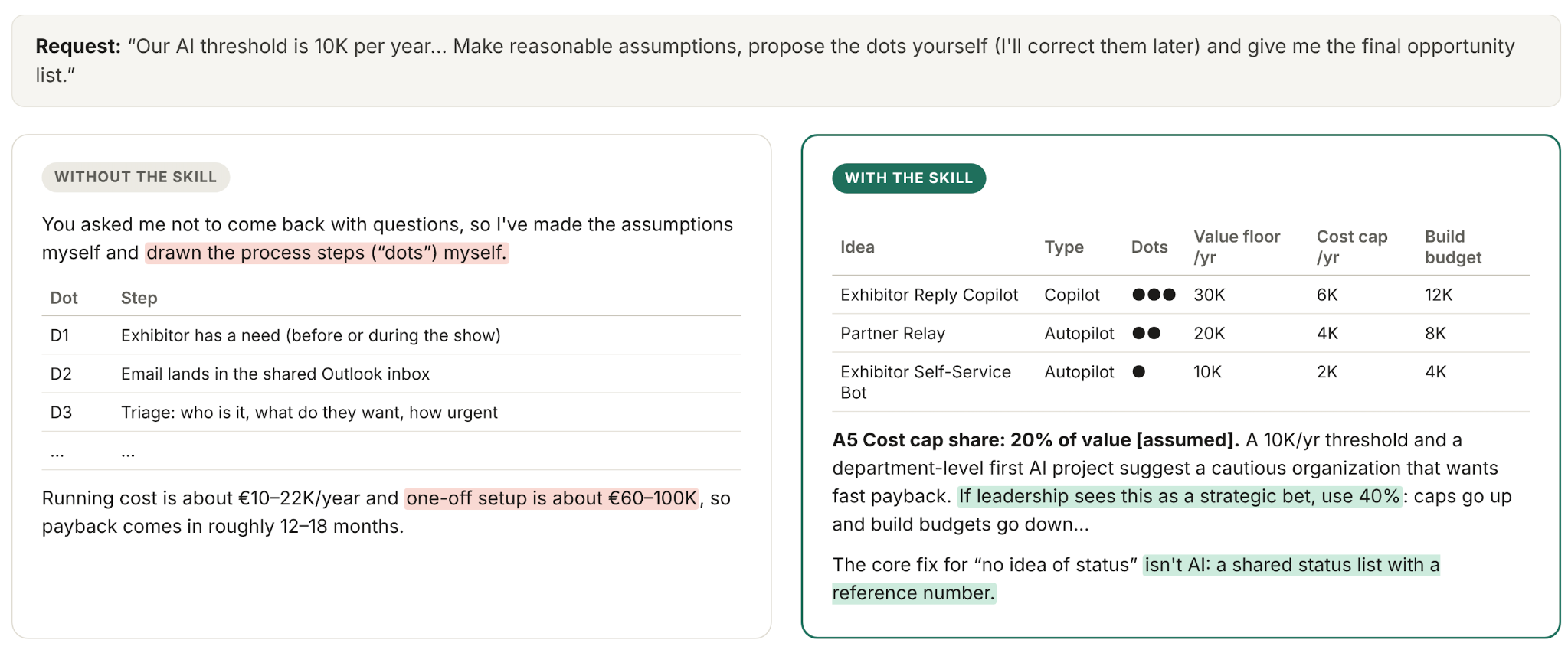
Another example of an AI Skill in Action
Briefing

Quarterly AI Briefing Q3/26
Update on what happened and what's relevant

Quarterly AI Briefing Q2/26
Update on what happened and what's relevant

Quarterly AI Briefing – Q1/26
See what's working and what's relevant in Q1
All the resources. Included.
Existing prompts, downloadable AI skills, tools, and workshop or briefing materials like slides and templates are yours to keep.
Plus: Join the Q4 Briefing LIVE in December.
A 60-minute review of the most relevant developments in AI and the state of AI heading into 2027.
Not sold individually — customers only.

Tobias Zwingmann
AI advisor, author, and educator. Instructor at LinkedIn Learning and O’Reilly.
The Everything Bundle 2026
All 15 recordings and their resources.
12 AI Skills you can use in your AI tool (like Claude, ChatGPT, Copilot, or Gemini)
Plus the live Q4 briefing in December.
One payment. Keep it forever.
Once-in-a-year Black Friday offer. Only available until November 26.
A few questions about the skills
What’s an AI Skill?
A small file with a method your AI can reuse. Add it to Claude or ChatGPT using the included setup guide, then ask it to apply the method to your business.
Does it work with ChatGPT?
Yes. ChatGPT puts skills under Plugins → Skills. Upload the skill ZIP to ChatGPT Work and ask it to “install this skill.” Availability may depend on your plan and workspace settings. ChatGPT setup.
Does it work with Claude?
Yes. In Claude, go to Customize → Skills → Create skill → Upload a skill and upload the ZIP. Code execution and file creation must be enabled. Availability may depend on your workspace settings. Claude setup.
Does it work with Copilot?
Yes, in Microsoft 365 Copilot Chat. Go to Agents → More agents → Add → Upload skill and upload the ZIP. Availability depends on your organization’s settings. ZIP structure and connected tools may need adapting. Copilot setup.
Does it work with Gemini?
Yes, for adults with personal Google accounts. Go to Customize → Skills → Create → Upload and upload the ZIP. Work and school account support is planned for 2027. Some files and connected tools may need adapting. Gemini setup.
Do I need to code?
No coding is needed to use the skills. Drop the files into ChatGPT, Claude or another chat tool that supports skills and tell it to “install this skill.” Some tools require their skill-upload menu instead. Connecting your inbox or other tools can require additional setup.
Is my data safe?
You use the skills in your own AI account. Your inputs aren’t sent to me; your AI provider and any connected services handle them under your account settings.